












Fish Eat Fish.io
Epic Plane Evolution

Spring Spear: Aim & Snap

Heartopia

Escalators

Love Tester - Find Real Love

Survivalcraft

Gangs Wars: Pixel Shooter RP

Weapon Master: Gun Shooter Run

Ride Master: Car Builder Game

Aha World: Create Stories
TutoTOONS
Updated
Oct 28, 2026
Category
Game
Installs
10M+
Rating
Updated
Oct 28, 2026
Category
Game
Developer
TutoTOONS
Installs
10M+
Rating
Game Screenshots

Game Overview
Imagination Playground
Aha World: Create Stories is a colorful digital dollhouse where kids can build their own mini worlds, act out everyday life, and invent silly adventures. Drag characters around, dress them up, and mix different objects to see what happens—it feels like a giant interactive toy box inside your screen 🤩.
Living Cartoon World
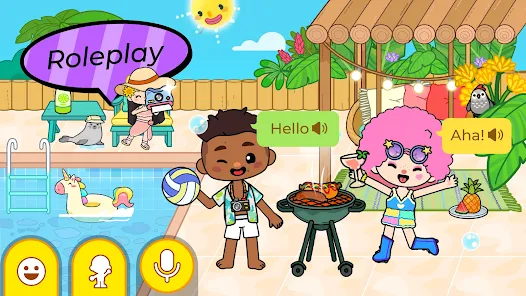
Every scene works like a tiny animated set: open the fridge, switch on the TV, cook meals, ride the bus, or go to school. Characters respond in funny, unexpected ways, making every tap feel like a little surprise. There are no strict rules—just open-ended role-play that grows with a child’s imagination 🎨.
Safe Space for Free Play
Made for kids with no scary content and very simple controls. Easy tap-and-drag actions let even younger players explore comfortably. Parents can relax while kids experiment freely, create their own stories, and learn everyday routines through playful interaction 💡.
Endless Stories to Discover
From homes to cities, shops to playgrounds, each location introduces new props, outfits, and funny moments. Mix different places, swap characters, and remix scenes to create unlimited stories—today a chef, tomorrow a superhero, or even a sleepy cat on holiday 😺.
How to Get Started
Step 1: Jump Into the World
Step 2: Open the app and step into a lively town filled with houses, shops, and exciting locations. Tap around to explore and see what everything does. With no timers or pressure, it’s all about tapping, dragging, and experimenting like a giant digital toy set 😎.
Step 3: Choose a Location
Step 4: Use the map or icons to travel to places like home, school, or different stores. Each area has its own rooms and interactive objects. Try different spots to uncover where the next funny surprise is waiting.
Step 5: Move Characters Around
Step 6: Tap a character to select them, then drag to place them in rooms or onto objects. Want more action? Drag new characters from the bottom bar into the scene and start building your own cast of story characters.
Step 7: Interact With Everything
Step 8: Tap furniture, doors, food, and gadgets to trigger reactions—open closets, sit on chairs, cook meals, switch on lights, or flush toilets just for fun. Many objects have multiple animations, so keep experimenting with different taps 😉.
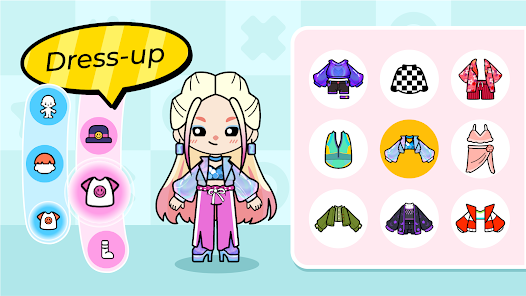
Step 9: Dress Up and Customize
Step 10: Drag clothes, hats, and accessories onto characters to change their look. Mix funny outfits, uniforms, or comfy pajamas, and switch styles anytime to fit the story you’re creating.
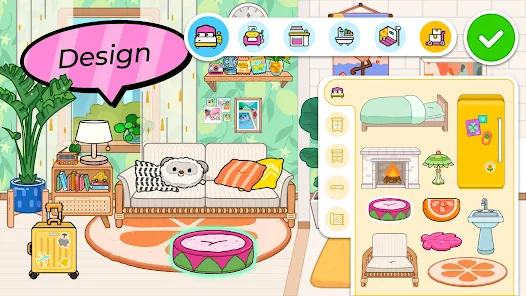
Step 11: Build Your Own Scenes
Step 12: Move characters around, assign them roles in your imagination (like student, chef, or parent), and act out everyday life or wild adventures. Change locations, use props, and create dialogues—like directing your own mini cartoon show.
Step 13: Explore, Reset, and Replay
Step 14: Made a mess or want a fresh start? Just leave and re-enter the area to reset everything. Try new combinations of characters, places, and objects to keep creating fresh stories and make every play session feel new 🌈.
Download App
Star Ratings
More Games to Play


















Disclaimer
Playcove is not affiliated with nor represents any developer, and is not the developer of any App or game.
Playcove solely collects and displays information from Google Play, including screenshots, historical version APK files, and download links.
All trademarks, registered trademarks, product names, company names, and logos appearing on this site are the property of their respective owners.
We guarantee the security of all APK files provided on our site and also provide official download links from Google Play and the App Store for your reference.