












Fish Eat Fish.io
Epic Plane Evolution

Spring Spear: Aim & Snap

Heartopia

Escalators

Love Tester - Find Real Love

Survivalcraft

Gangs Wars: Pixel Shooter RP

Weapon Master: Gun Shooter Run

Ride Master: Car Builder Game

Ayla World :Avatar City
XD Entertainment Pte Ltd
Updated
Oct 28, 2026
Category
Simulation
Installs
10M+
Rating
Updated
Oct 28, 2026
Category
Simulation
Developer
XD Entertainment Pte Ltd
Installs
10M+
Rating
Game Screenshots


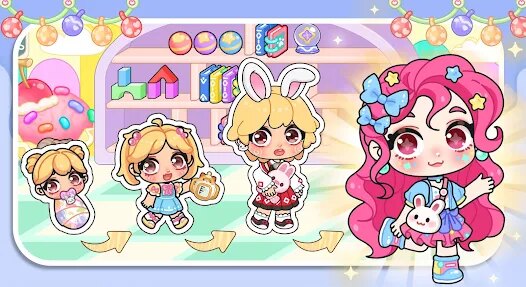



Game Overview
A Charming World Full of Personality 🏙️
Step into a lively virtual city where adorable 3D avatars can explore, socialize, and express themselves in endless ways. From colorful neighborhoods to seasonal activities and entertaining mini-games, the world is always expanding with something new to discover.
Express Yourself with Endless Fashion 💄
Design a one-of-a-kind avatar using stylish clothing, trendy hairstyles, playful accessories, and expressive facial features. Blend casual street fashion, fantasy-inspired outfits, and cute kawaii looks, then switch styles whenever inspiration strikes or the occasion changes.
Make Friends and Share the Fun 🌍
Connect with players from around the globe, hang out in lively plazas, attend virtual parties, or relax in cozy social spaces. Chat, use fun emotes and stickers, snap memorable photos, and create everyday moments worth sharing with friends.
Enjoy Life Around Every Corner 🎮
Visit cafés, shopping districts, parks, and hidden locations packed with quests, collectibles, and entertaining activities. Earn rewards, unlock decorative items, and build your own fashionable lifestyle in a cheerful world that feels like starring in an interactive animated series.
How to Get Started
Step 1: Getting Started 🚀
Step 2: Step into Ayla World by launching the game, choosing a nickname, and building your very first avatar. Follow the beginner prompts to learn how to move, interact, and explore the city. Before long, you’ll unlock lively hubs like plazas, cafés, and party areas for free roaming 🌆.
Step 3: Create and Style the Avatar 🎨
Step 4: Start by customizing your character’s appearance—body shape, skin tone, facial features, and hairstyle. Then dress up with outfits, shoes, and accessories. Tap to preview combinations, mix different styles, and save outfits you love for quick changes later 👗.
Step 5: Move Around the City 🚶
Step 6: Use the on-screen joystick to walk or sprint through different locations. Tap the map to fast travel to spots like the Plaza, Café, or your Home. Keep an eye out for glowing icons or NPC markers—they usually lead to quests or fun interactions 🗺️.
Step 7: Chat and Make Friends 💬
Step 8: Tap other players to view their profile and social options. Use chat, preset messages, or emotes to say hello and interact naturally 😊. You can send friend requests, visit their rooms, or team up for group activities and mini-games 🤝.
Step 9: Play Mini-Games and Events 🎮
Step 10: Enter event zones or special portals scattered around the city to start mini-games. Follow the simple instructions—whether it’s racing, collecting, or rhythm challenges. Winning earns coins, rewards, or limited-time event items 🎁.
Step 11: Decorate and Manage Home 🏠
Step 12: Head to your personal home space and open the furniture menu. Place beds, sofas, lights, and decorations freely. Drag, rotate, and adjust layouts until everything feels right, then invite friends over for hangouts or screenshots 📸.
Step 13: Earn Rewards and Level Up 🌟
Step 14: Complete daily tasks, login bonuses, and event missions to collect coins and exclusive items. Use them to buy new outfits or furniture. As you level up, you’ll unlock new areas, gestures, and stylish gear to expand your city life experience ✨
Download App
Star Ratings
More Games to Play











Disclaimer
Playcove is not affiliated with nor represents any developer, and is not the developer of any App or game.
Playcove solely collects and displays information from Google Play, including screenshots, historical version APK files, and download links.
All trademarks, registered trademarks, product names, company names, and logos appearing on this site are the property of their respective owners.
We guarantee the security of all APK files provided on our site and also provide official download links from Google Play and the App Store for your reference.