












Fish Eat Fish.io
Epic Plane Evolution

Spring Spear: Aim & Snap

Heartopia

Escalators

Love Tester - Find Real Love

Survivalcraft

Gangs Wars: Pixel Shooter RP

Weapon Master: Gun Shooter Run

Ride Master: Car Builder Game
Block Craft 3D:Building Game
Fun Games For Free
Updated
Oct 28, 2026
Category
Game
Installs
10M+
Rating
Updated
Oct 28, 2026
Category
Game
Developer
Fun Games For Free
Installs
10M+
Rating
Game Screenshots
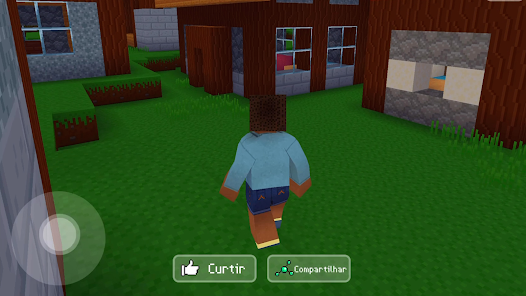
Game Overview
Creative Sandbox Adventure
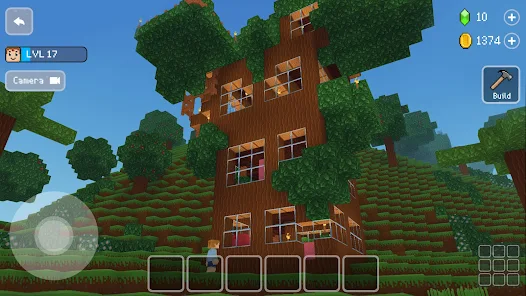
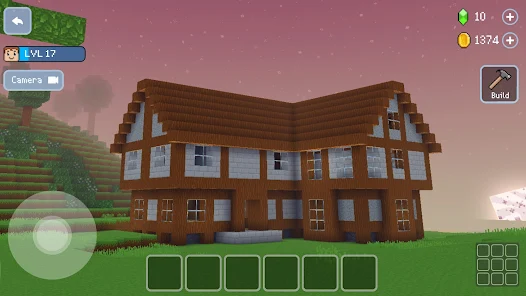
Step into a vibrant voxel world where every block helps shape your own town 😎. Build cozy homes, lively villages, or towering landmarks, then explore everything in first-person. Every map is fully editable and ready for endless creativity.
Create Without Limits
From small cottages to massive sky castles, place and remove blocks to bring your ideas to life. Mix different materials, stairs, glass, and decorations to create cozy homes, epic structures, or wonderfully bizarre designs 🤩.
Friendly NPCs and Pets
Bring your world to life with villagers, animals, and charming characters. Invite NPCs to settle in your town, adopt adorable pets, and watch your peaceful community grow around you 🐱. It's the perfect place to relax and build.
Offline Play, Easy Building
Enjoy smooth performance on most devices, even without an internet connection, making it ideal for creative fun anywhere 🚀. Simple tap, hold, and swipe controls make building large projects easy, relaxing, and rewarding.
How to Get Started
Step 1: Getting Started
Step 2: Launch the game, enter your first village, and follow the quick tutorial. Explore the world, learn the basics, and build a simple shelter before taking on larger building projects 🧱.
Step 3: Move and Explore
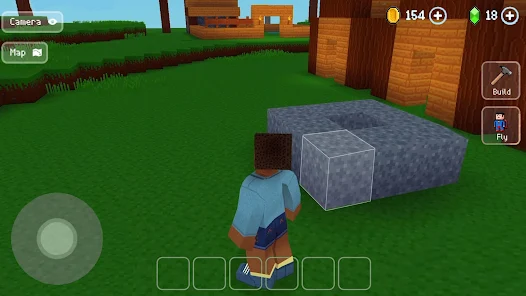
Step 4: Use the virtual joystick on the left to walk around. Swipe on the right side of the screen to look in any direction. Use both thumbs together to move smoothly and explore every part of the map.
Step 5: Build or Remove Blocks
Step 6: Tap the tool button to switch between building and breaking blocks. In destroy mode, tap blocks to remove them. In build mode, tap where the white outline appears to place new blocks on the ground or walls.
Step 7: Pick Building Materials
Step 8: Open the inventory to browse different block types, including wood, stone, glass, and decorations. Select the item you want, close the menu, and start placing it wherever you like 😄.
Step 9: Complete Easy Quests
Step 10: Friendly NPCs offer simple tasks like "build a house" or "add some windows." Finish these missions to earn coins and unlock extra content. They're optional but perfect for learning the basics.
Step 11: Add Villagers and Pets
Step 12: Spend coins in the shop to unlock villagers, animals, and special NPCs. Place them anywhere in your town, and they'll wander around, making your world feel more lively and welcoming 🐶.
Step 13: Save and Find Inspiration
Step 14: Your progress is saved automatically, but you can also check your save through the pause menu. Visit other players' worlds online for fresh ideas, then return to expand and improve your own creations ✨.
Download App
Star Ratings
More Games to Play















Disclaimer
Playcove is not affiliated with nor represents any developer, and is not the developer of any App or game.
Playcove solely collects and displays information from Google Play, including screenshots, historical version APK files, and download links.
All trademarks, registered trademarks, product names, company names, and logos appearing on this site are the property of their respective owners.
We guarantee the security of all APK files provided on our site and also provide official download links from Google Play and the App Store for your reference.