












Love Tester - Find Real Love
Survivalcraft

Gangs Wars: Pixel Shooter RP

Weapon Master: Gun Shooter Run

Ride Master: Car Builder Game

Townscaper
FPS Commando Shooting Games

Papa's Cluckeria To Go!

War Robots Multiplayer Battles

Bullet Stack

Bridge Constructor Portal
Headup GmbH
Updated
Sep 13, 2026
Category
Puzzle
Installs
10M+
Rating
Updated
Sep 13, 2026
Category
Puzzle
Developer
Headup GmbH
Installs
10M+
Rating
Game Screenshots
Game Overview
Mind-Bending Test Chambers
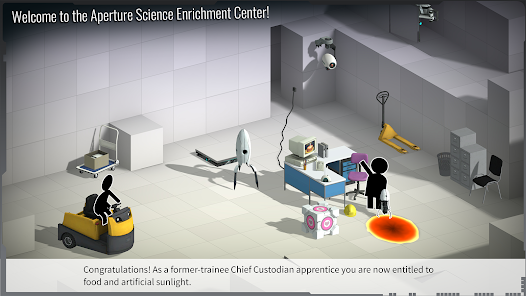
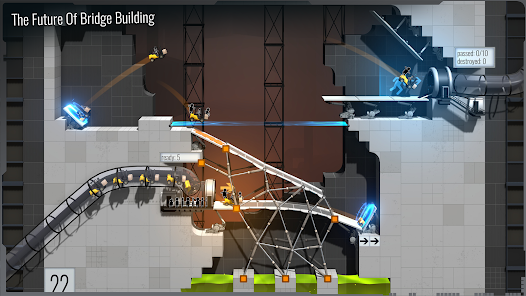
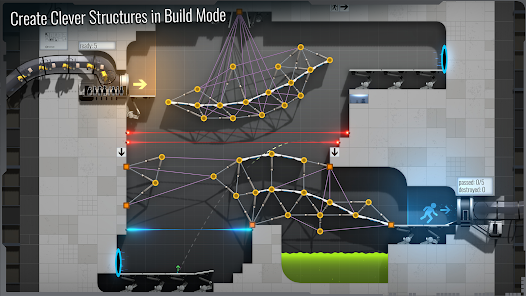
Bridge Constructor Portal combines classic bridge-building gameplay with the physics and puzzles of the Portal universe 😎. Design ramps, roads, and creative contraptions inside Aperture Science labs to safely guide forklifts and vehicles to the exit doors.
Portal Meets Engineering Fun
Familiar Portal elements like portals, propulsion gel, repulsion gel, turrets, and companion cubes turn each chamber into a chaotic experimental playground 🤯. Every level invites trial, error, and hilarious chain reactions as your structures are tested by physics.
Comedy in a Science Lab
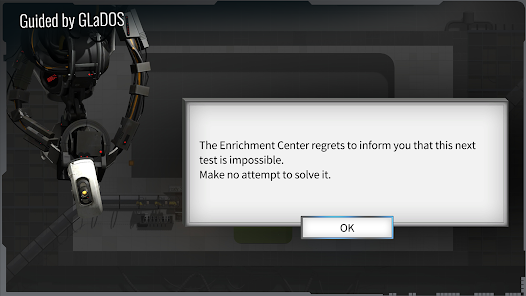
GLaDOS returns with her signature dark humor, sarcastic commentary, and “helpful” advice 😏. Failures are part of the experience—watch vehicles crash, flip, or explode, then refine your design and try again with improved engineering.
Creative Problem Solving
Each puzzle offers multiple solutions, from efficient minimal bridges to overbuilt structures barely holding together 😄. There’s no single correct answer—just experimentation, creativity, and physics-driven chaos at your own pace.
How to Get Started
Step 1: Getting Started
Step 2: Your goal in every chamber is to build structures that safely guide vehicles from the entry point to the exit without crashing 💥.
Step 3: Learn the Interface
Step 4: Tap nodes to place anchor points, then drag between them to build beams or road segments. Use zoom and pan to carefully inspect complex layouts.
Step 5: Build Solid Foundations
Step 6: Use orange beams for structural support and grey panels for roads. Form triangular shapes whenever possible to improve stability and prevent collapse.
Step 7: Use Portals Smartly
Step 8: Vehicles entering a blue or orange portal will exit through its paired portal. Align road angles carefully so vehicles exit smoothly without falling or crashing.
Step 9: Play with Gels and Devices
Step 10: Use propulsion gel to increase speed and repulsion gel to create bouncing effects. Combine ramps, platforms, and supports to safely control vehicle movement through each test chamber 🧪.
Step 11: Test and Adjust
Step 12: Run simulations to test your design. Watch for weak points, then pause and reinforce unstable areas or adjust angles to improve performance.
Step 13: Handle Convoys
Step 14: Once a single vehicle succeeds, test with full convoys 🚗🚗🚗. Strengthen stress points, widen paths, and eliminate bottlenecks to ensure all vehicles reach the exit safely.
Download App
Star Ratings
More Games to Play





















Disclaimer
Playcove is not affiliated with nor represents any developer, and is not the developer of any App or game.
Playcove solely collects and displays information from Google Play, including screenshots, historical version APK files, and download links.
All trademarks, registered trademarks, product names, company names, and logos appearing on this site are the property of their respective owners.
We guarantee the security of all APK files provided on our site and also provide official download links from Google Play and the App Store for your reference.