












Fish Eat Fish.io
Epic Plane Evolution

Spring Spear: Aim & Snap

Heartopia

Escalators

Love Tester - Find Real Love

Survivalcraft

Gangs Wars: Pixel Shooter RP

Weapon Master: Gun Shooter Run

Ride Master: Car Builder Game

Call of Duty: Mobile Season 11
Activision Publishing, Inc.
Updated
Oct 28, 2026
Category
Action
Installs
10M+
Rating
Updated
Oct 28, 2026
Category
Action
Developer
Activision Publishing, Inc.
Installs
10M+
Rating
Game Screenshots



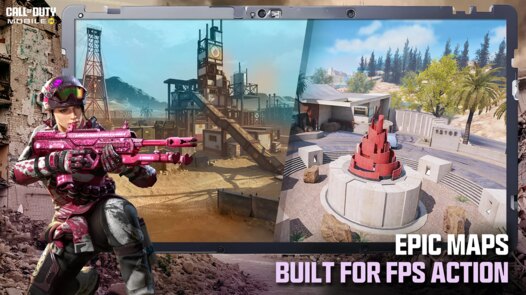
Game Overview
High-Action Tactical Shooter
Call of Duty: Mobile Season 11 delivers fast-paced FPS action with iconic maps, popular game modes, and legendary operators 💥. Jump into ranked battles, casual matches, and limited-time events, all designed for quick gameplay and responsive touch controls.
Console-Level Mobile Experience
Enjoy impressive graphics, immersive audio, and responsive gunplay that bring a console-like feel to your phone 😎. Adjustable controls, sensitivity settings, and device optimization help every match run smoothly, even during heated firefights.
Action-Packed Multiplayer & Battle Royale
Switch between 5v5 Multiplayer, Sniper-only battles, Zombies events, and large-scale Battle Royale matches filled with vehicles, loot, and nonstop action 🔫. Seasonal updates and rotating modes keep every match exciting.
Unlock Rewards & Build Your Loadout
Progress through the Battle Pass to earn epic weapon blueprints, operators, and weapon camos 🎁. Customize your loadouts with perks, scorestreaks, and attachments to fit any combat style, whether you prefer stealth tactics or aggressive rushing.
How to Get Started
Step 1: Start Your Mission
Step 2: Install the game, sign in with a guest or linked account, and complete the quick tutorial to learn movement, aiming, and shooting 🎯. Once you're ready, jump into Multiplayer to sharpen your skills before taking on Ranked or Battle Royale.
Step 3: Master the Controls
Step 4: Move with your left thumb and aim with your right. Test both Simple and Advanced firing modes in Settings, then choose the one that feels most comfortable. Fine-tune your sensitivity for smooth aiming and tracking.
Step 5: Adjust Your HUD
Step 6: Open Settings → Controls to move, resize, and save your button layout. Turn on gyroscope if you enjoy motion aiming. Lower graphics for smoother performance on weaker devices, or increase visual quality on more powerful phones.
Step 7: Create Your Loadout
Step 8: Head to the Loadout menu and equip a primary weapon—an assault rifle is a great choice for beginners—along with a secondary weapon, grenade, and operator skill. Use Gunsmith to add optics, grips, and magazines that improve recoil control and faster ADS 🔧.
Step 9: Practice in Core Modes
Step 10: Start with Frontline and Team Deathmatch to learn map layouts and improve your gunfights. These modes let you build aiming and positioning skills before moving on to objective-based matches like Domination or Hardpoint.
Step 11: Enter Battle Royale
Step 12: Choose Battle Royale, select a class such as Medic or Scout, and deploy with your squad. Land in quieter areas, gather weapons, armor, and ammo, then stay inside the safe zone. Use vehicles to rotate quickly and avoid dangerous situations 🚗.
Step 13: Earn Seasonal Rewards
Step 14: Visit the Events tab every day to complete missions for XP, credits, and exclusive skins. Progress through the Battle Pass by playing matches, collect rewards regularly, and test new weapons in the Practice Range to keep improving 💼.
Download App
Star Ratings
More Games to Play












Disclaimer
Playcove is not affiliated with nor represents any developer, and is not the developer of any App or game.
Playcove solely collects and displays information from Google Play, including screenshots, historical version APK files, and download links.
All trademarks, registered trademarks, product names, company names, and logos appearing on this site are the property of their respective owners.
We guarantee the security of all APK files provided on our site and also provide official download links from Google Play and the App Store for your reference.