












Fish Eat Fish.io
Epic Plane Evolution

Spring Spear: Aim & Snap

Heartopia

Escalators

Love Tester - Find Real Love

Survivalcraft

Gangs Wars: Pixel Shooter RP

Weapon Master: Gun Shooter Run

Ride Master: Car Builder Game

Hit Master 3D - Knife Assassin
CASUAL AZUR GAMES
Updated
Oct 28, 2026
Category
Action
Installs
10M+
Rating
Updated
Oct 28, 2026
Category
Action
Developer
CASUAL AZUR GAMES
Installs
10M+
Rating
Game Screenshots
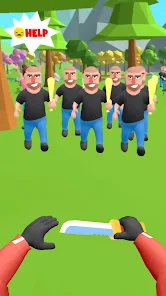
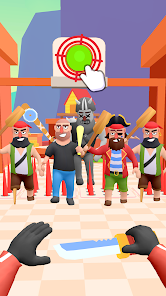
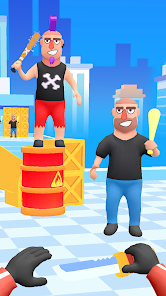
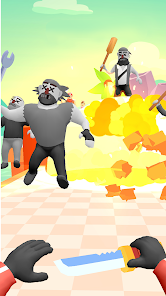
Game Overview
Fast-Paced Knife Throwing Fun
Hit Master 3D - Knife Assassin is a quick, arcade-style action game where enemies rush in and knives fly fast ⚔️. Tap to throw, eliminate waves of enemies, and rescue hostages in seconds. It’s built for short, satisfying bursts of gameplay and instant stress relief.
Satisfying One-Tap Gameplay
Every tap launches a spinning knife toward your target 🤪. With ragdoll physics and exaggerated reactions, each hit feels impactful and fun. Levels are short and direct—no tutorials, just immediate action from the start.
Creative Levels and Enemies
Stages introduce moving platforms, explosive barrels, and stacked obstacles 🎯. Enemies appear in different formations and behaviors, turning each level into a small action-puzzle that requires timing and quick decisions.
Lightweight, Offline-Friendly Action
Designed to run smoothly on most devices, with colorful 3D visuals and a small install size 📱. It works offline and offers quick missions that can often be completed in under a minute—perfect for casual play anywhere.
How to Get Started
Step 1: Gameplay Guide
Step 2: Hit Master 3D - Knife Assassin is all about timing your taps to eliminate enemies while keeping hostages safe. Use one finger, aim fast, and clear each stage efficiently.
Step 3: Launch the Game
Step 4: Start the game and jump directly into the first level. No sign-in or setup required—just tap and play.
Step 5: Focus on Targets
Step 6: Hold your device steady and watch for highlighted enemies. Pay attention to their positions before throwing.
Step 7: Tap to Throw Knives
Step 8: Tap the screen to launch knives at enemies or nearby explosive objects 💥. Precision matters for clean clears.
Step 9: Avoid Hitting Hostages
Step 10: Check carefully before throwing—hostages may be close to targets. Wait for safe openings before tapping.
Step 11: Watch Moving Objects
Step 12: Some levels include moving platforms and shifting enemies. Time your throws so targets line up correctly.
Step 13: Complete and Improve
Step 14: Finish levels to unlock new stages and tougher challenges. Replay missions to improve accuracy, speed, and overall performance 😁.
Download App
Star Ratings
More Games to Play














Disclaimer
Playcove is not affiliated with nor represents any developer, and is not the developer of any App or game.
Playcove solely collects and displays information from Google Play, including screenshots, historical version APK files, and download links.
All trademarks, registered trademarks, product names, company names, and logos appearing on this site are the property of their respective owners.
We guarantee the security of all APK files provided on our site and also provide official download links from Google Play and the App Store for your reference.