












Fish Eat Fish.io
Epic Plane Evolution

Spring Spear: Aim & Snap

Heartopia

Escalators

Love Tester - Find Real Love

Survivalcraft

Gangs Wars: Pixel Shooter RP

Weapon Master: Gun Shooter Run

Ride Master: Car Builder Game

Infinite Objects: Zoom & Find
Zephyr Mobile
Updated
Oct 28, 2026
Category
Puzzle
Installs
10M+
Rating
Updated
Oct 28, 2026
Category
Puzzle
Developer
Zephyr Mobile
Installs
10M+
Rating
Game Screenshots
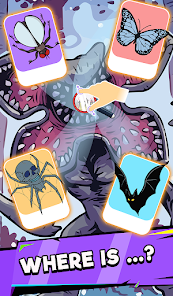



Game Overview
Endless Hidden Worlds
Step into a vast hand-drawn universe where every zoom uncovers new tiny stories 🧐✨. Each scene is filled with playful details, hidden secrets, and unexpected surprises, all waiting to be found with simple pinch and drag controls.
Relaxing Visual Puzzle
A calming blend of cozy vibes and light brain-teasing exploration. There are no timers or pressure—just slow, satisfying searching as you zoom in, scan carefully, and enjoy the rich details. Perfect for short breaks or long, relaxed sessions 😌.
Art Book Come to Life
Feels like browsing an interactive illustrated book. Every level is carefully designed with color, humor, and personality, turning each scene into a living comic strip that you explore rather than simply read 🎨.
Fun for All Ages
Easy to pick up, but surprisingly hard to stop playing. Kids are drawn to the cute hidden objects, adults enjoy the subtle challenge, and everyone gets that rewarding “found it!” moment 🥳.
How to Get Started
Step 1: Start Your Search
Step 2: Open the game, choose a scene, and dive into a world packed with tiny hidden objects. Follow the task list and use your fingers to explore every corner of the illustration.
Step 3: Choose a Level
Step 4: Tap any unlocked image to enter. New scenes are unlocked as you complete previous ones, letting you progress step by step through the full collection.
Step 5: Check the Task List
Step 6: Look at the list of objects or clues shown at the bottom or side of the screen. These are the items you need to find in the current scene 🔍.
Step 7: Zoom In and Out
Step 8: Use two fingers to pinch out to zoom in and pinch in to zoom out. Zoom in for fine details, then zoom out to get the full picture and better spot clues.
Step 9: Drag to Explore
Step 10: Hold and drag your finger across the screen to move around the large scene. Move slowly and carefully so no small hidden objects are missed 😉.
Step 11: Tap to Collect
Step 12: When you spot an item from the list, simply tap it. If correct, it will be marked as found or removed from the list, helping you progress through the level.
Step 13: Use Hints if Stuck
Step 14: If you can’t find an item, tap the hint button (when available). It will highlight or guide you toward the hidden object—perfect for those last tricky finds 😅.
Download App
Star Ratings
More Games to Play






















Disclaimer
Playcove is not affiliated with nor represents any developer, and is not the developer of any App or game.
Playcove solely collects and displays information from Google Play, including screenshots, historical version APK files, and download links.
All trademarks, registered trademarks, product names, company names, and logos appearing on this site are the property of their respective owners.
We guarantee the security of all APK files provided on our site and also provide official download links from Google Play and the App Store for your reference.