












Fish Eat Fish.io
Epic Plane Evolution

Spring Spear: Aim & Snap

Heartopia

Escalators

Love Tester - Find Real Love

Survivalcraft

Gangs Wars: Pixel Shooter RP

Weapon Master: Gun Shooter Run

Ride Master: Car Builder Game
Pocket City 2
Codebrew Games
Updated
Oct 28, 2026
Category
Simulation
Installs
10M+
Rating
Updated
Oct 28, 2026
Category
Simulation
Developer
Codebrew Games
Installs
10M+
Rating
Game Screenshots
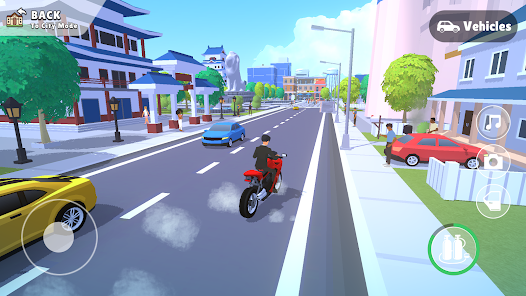
Game Overview
Create the City You've Always Imagined 🌆
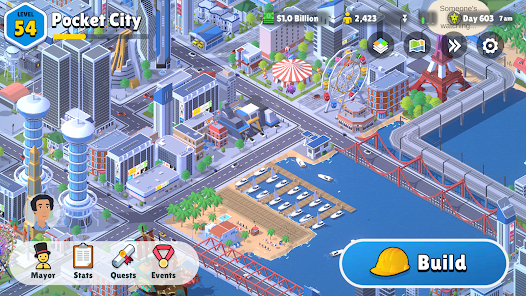
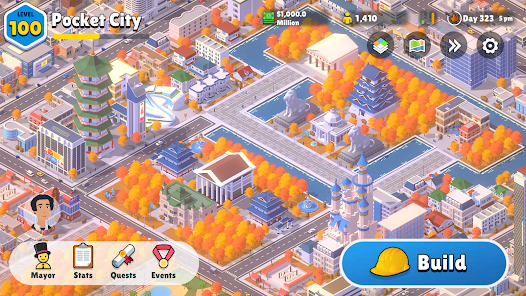
Pocket City 2 offers a relaxing 3D city-building experience where every street, neighborhood, park, and skyscraper is designed by you. Watch traffic move naturally, residents go about their daily routines, and a quiet town gradually transform into a thriving urban center.
Experience Life as the Mayor 🧑💼
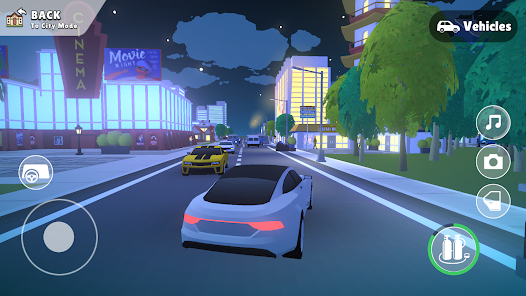
Take charge of your city by completing missions, expanding into new districts, and unlocking exciting features. Unlike traditional city builders, you can explore your creation on foot or behind the wheel, uncovering hidden locations, local events, and fun surprises throughout the streets.
Deep Simulation with Effortless Building 🎯
Beneath its accessible design lies a detailed simulation where citizens work, commute, shop, and relax according to the city you've planned. Intuitive controls let you zone neighborhoods, lay roads, and place essential services with just a few taps, making construction satisfying for both newcomers and experienced builders.
Build Freely, Anytime, Anywhere ✅
Enjoy the complete city-building experience offline without energy systems or intrusive interruptions. Experiment with different layouts, expand at your own pace, and create unique cities whenever inspiration strikes, whether you're playing for a few minutes or an entire evening.
How to Get Started
Step 1: Getting Started 🚀
Step 2: Begin your journey by launching the game and selecting a new city slot. Pick a map and difficulty level, then ease into the experience with early tutorial prompts that guide you through the basics of city-building 🏙️
Step 3: Found Your City Core 🧭
Step 4: Start fresh by choosing a save slot and confirming your setup. The game will gently introduce key mechanics step by step, helping you understand how to place, expand, and organize your growing settlement 🧱
Step 5: Lay Down the Road Network 🚧
Step 6: Open the build menu and select Roads, then drag to create your first streets. Make sure your roads connect to the main highway so traffic can flow into your city and development can begin smoothly 🚗
Step 7: Assign City Zones 🏗️
Step 8: Switch to zoning tools and paint your land: green for residential homes, blue for commercial shops, and yellow for industrial buildings. As demand rises, structures will automatically appear along your roads and start forming your cityscape 🏢
Step 9: Power Up & Provide Services ⚡
Step 10: Place a power plant first to energize your city, then add water systems and essential services like fire stations, police, and hospitals. Check coverage maps to ensure no area is left unsupported or unsafe 🧯
Step 11: Balance Budget & Expand 💰
Step 12: Open the city overview to monitor income, spending, and tax flow. Use your earnings wisely to unlock new buildings, upgrade infrastructure, and expand your territory when your economy is strong enough 📊
Step 13: Explore Your City in Motion 🌆
Step 14: Switch to first-person or free-roam view to experience your city up close. Walk, drive, or fly around to visit landmarks, interact with citizens, and complete small quests that bring extra rewards and life to your creation 🚁
Download App
Star Ratings
More Games to Play


















Disclaimer
Playcove is not affiliated with nor represents any developer, and is not the developer of any App or game.
Playcove solely collects and displays information from Google Play, including screenshots, historical version APK files, and download links.
All trademarks, registered trademarks, product names, company names, and logos appearing on this site are the property of their respective owners.
We guarantee the security of all APK files provided on our site and also provide official download links from Google Play and the App Store for your reference.