












Fish Eat Fish.io
Epic Plane Evolution

Spring Spear: Aim & Snap

Heartopia

Escalators

Love Tester - Find Real Love

Survivalcraft

Gangs Wars: Pixel Shooter RP

Weapon Master: Gun Shooter Run

Ride Master: Car Builder Game

RFS - Real Flight Simulator
RORTOS
Updated
Oct 28, 2026
Category
Simulation
Installs
10M+
Rating
Updated
Oct 28, 2026
Category
Simulation
Developer
RORTOS
Installs
10M+
Rating
Game Screenshots


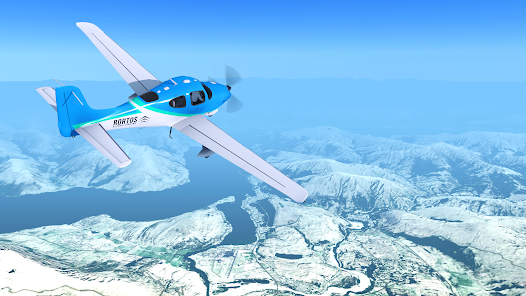

Game Overview
An Ultra-Realistic Flight Simulation ✈️
RFS – Real Flight Simulator transforms your mobile device into a fully featured cockpit. Pilot highly detailed 3D aircraft, experience realistic flight physics, and fly through dynamic weather, day-and-night cycles, and stunning real-world landscapes.
Fly Around the World 🌍
Depart from thousands of real-world airports and follow authentic flight routes across the globe. Monitor live air traffic, receive ATC-style instructions, and share the skies with pilots flying online in real time.
Detailed Systems With Easy Controls 🧭
Take control of engines, flaps, lights, fuel management, and navigation through immersive cockpit instruments, while intuitive touch controls keep flying accessible. Whether you're a beginner or an aviation enthusiast, every takeoff, landing, and long-haul journey feels smooth and rewarding.
Multiplayer Flights and Community Features 😎
Join online multiplayer sessions, communicate with fellow pilots, and take part in shared flights and special events. Customize aircraft liveries, replay your best landings, and capture cinematic screenshots to show off those perfectly smooth touchdowns.
How to Get Started
Step 1: RFS begins by choosing an aircraft and an airport, then following realistic flight procedures. Plan your route, manage the throttle and flaps for takeoff, climb to cruising altitude, navigate to your destination, and complete a smooth landing. Start with beginner-friendly settings and gradually increase the realism as your skills improve.
Step 2: Choose a Game Mode and Aircraft
Step 3: Launch the game and select Solo or Multiplayer mode. In Solo, pick a beginner-friendly airliner or light aircraft. Review its speed, range, and other specifications before loading into the cockpit.
Step 4: Set Your Flight Plan
Step 5: Use the map to choose your departure and arrival airports. Adjust the time of day, weather conditions, and realism settings. Beginners should start with clear skies and simplified options, while experienced pilots can enable turbulence, system failures, and realistic flight physics.
Step 6: Get Familiar With the Cockpit
Step 7: Take a moment to explore the controls, including the throttle, flaps, landing gear, brakes, and autopilot. Swipe to look around the cockpit and switch between cockpit, external, and tower camera views before taxiing to the runway.
Step 8: Perform a Smooth Takeoff
Step 9: Follow the taxiway markings to the runway, line up with the centerline, and gradually increase the throttle to takeoff power. Keep the aircraft steady, rotate at the proper speed, then retract the landing gear and raise the flaps in stages after liftoff.
Step 10: Cruise With Autopilot
Step 11: Once you've reached a safe altitude, activate the autopilot and set your heading, altitude, and airspeed. Follow your planned route while monitoring fuel levels, engine performance, and weather conditions, making small corrections whenever necessary.
Step 12: Land Safely and Keep Improving
Step 13: As you approach your destination, reduce speed, extend the flaps and landing gear, and line up with the runway. Maintain a stable descent, touch down smoothly, then slow the aircraft using brakes and reverse thrust. After each flight, review your performance, experiment with new routes, and gradually take on more challenging weather and realism settings to sharpen your piloting skills. 😄
Download App
Star Ratings
More Games to Play
















Disclaimer
Playcove is not affiliated with nor represents any developer, and is not the developer of any App or game.
Playcove solely collects and displays information from Google Play, including screenshots, historical version APK files, and download links.
All trademarks, registered trademarks, product names, company names, and logos appearing on this site are the property of their respective owners.
We guarantee the security of all APK files provided on our site and also provide official download links from Google Play and the App Store for your reference.