












Fish Eat Fish.io
Epic Plane Evolution

Spring Spear: Aim & Snap

Heartopia

Escalators

Love Tester - Find Real Love

Survivalcraft

Gangs Wars: Pixel Shooter RP

Weapon Master: Gun Shooter Run

Townscaper

Ride Master: Car Builder Game
CASUAL AZUR GAMES
Updated
Oct 28, 2026
Category
Racing
Installs
10M+
Rating
Updated
Oct 28, 2026
Category
Racing
Developer
CASUAL AZUR GAMES
Installs
10M+
Rating
Game Screenshots


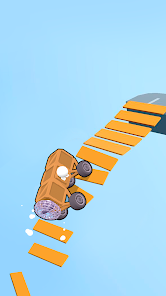
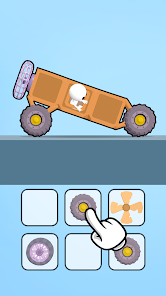
Game Overview
Build, Customize, and Race
Ride Master: Car Builder Game combines arcade highway driving with creative vehicle customization 🚗. Start with a simple car, install new parts, upgrade performance, and race through busy highways while weaving between traffic. Every session delivers fast action and satisfying progression.
Design Your Dream Ride
Step into a fully equipped garage where you can swap bumpers, spoilers, wheels, engines, and paint schemes. Create anything from sleek sports cars to outrageous custom builds, with upgrades that improve both appearance and on-road performance.
High-Speed Traffic Challenges
Race through crowded roads filled with cars, trucks, and unexpected obstacles. Quick steering, smart lane changes, and precise timing are the keys to surviving longer runs, collecting more coins, and setting higher scores 🔥.
Unlock More Parts and Vehicles
Complete races to earn rewards that unlock new vehicles, performance upgrades, and cosmetic items. Keep improving your garage, experiment with different setups, and return to tougher highways with faster, stronger, and more stylish machines.
How to Get Started
Step 1: Getting Started
Step 2: Choose your first vehicle, customize it in the garage, then head onto the highway to dodge traffic, collect coins, and unlock better cars and upgrades. The more successful your runs, the more customization options become available.
Step 3: Visit the Garage
Step 4: Open the garage and select a starter vehicle. Browse the available customization categories and become familiar with the different body parts and upgrade options before beginning your first race.
Step 5: Customize Your Car
Step 6: Replace components such as wheels, spoilers, bumpers, and body kits. Preview every change in real time, then save your favorite design before heading onto the road.
Step 7: Upgrade Performance
Step 8: Spend earned coins to improve important stats like engine power, acceleration, handling, and durability. Early on, upgrading handling makes it easier to avoid heavy traffic and maintain control.
Step 9: Personalize the Appearance
Step 10: Open the paint section to apply new colors, decals, and finishes. Experiment with different combinations to create a vehicle that stands out while racing.
Step 11: Start Racing
Step 12: Begin a race and steer by swiping or using your preferred control option. Avoid collisions, collect coins, and drive close to other vehicles for bonus rewards while staying safely on the road.
Step 13: Earn Rewards and Improve
Step 14: After every race, collect your winnings and invest them in better upgrades, new customization parts, and additional vehicles. Continue refining your builds, challenge longer highways, and aim for higher scores with every run.
Download App
Star Ratings
More Games to Play



Disclaimer
Playcove is not affiliated with nor represents any developer, and is not the developer of any App or game.
Playcove solely collects and displays information from Google Play, including screenshots, historical version APK files, and download links.
All trademarks, registered trademarks, product names, company names, and logos appearing on this site are the property of their respective owners.
We guarantee the security of all APK files provided on our site and also provide official download links from Google Play and the App Store for your reference.