












Fish Eat Fish.io
Epic Plane Evolution

Spring Spear: Aim & Snap

Heartopia

Escalators

Love Tester - Find Real Love

Survivalcraft

Gangs Wars: Pixel Shooter RP

Weapon Master: Gun Shooter Run

Ride Master: Car Builder Game

Spider Fighter 3
Starplay DMCC
Updated
Oct 28, 2026
Category
Action
Installs
10M+
Rating
Updated
Oct 28, 2026
Category
Action
Developer
Starplay DMCC
Installs
10M+
Rating
Game Screenshots


Game Overview
Heroic City Brawler
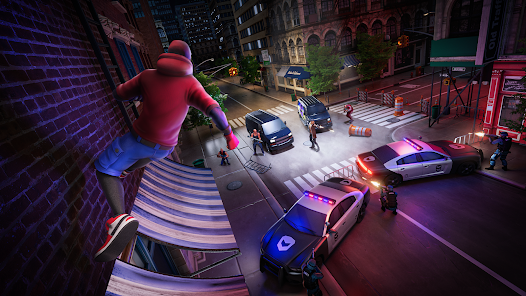
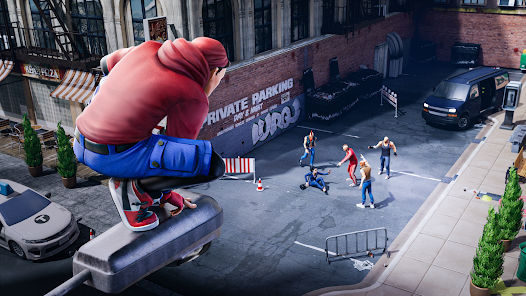
Spider Fighter 3 is a fast-paced superhero beat âem up where a masked vigilante swings through a crime-ridden city and smashes bad guys in style ð. Dive into openâarea streets, rooftops, and alleys packed with gangsters, bosses, and cinematic battles.
Dynamic Combat Playground
Enjoy smooth melee combos, aerial kicks, web-style moves, and powerful finishers ð¥. The combat feels responsive and flashy, letting every punch and dodge turn into a mini action movie thatâs easy to pick up but fun to master.
Deep Hero Upgrades
Unlock new abilities, skills, and combat stances as the hero levels up ð§. Customize fighting style, boost stats, and collect gear so each run through the city feels stronger, faster, and more satisfying.
Story Missions & Free Roam Fun
Follow a crime-fighting storyline, or just roam the city to clean up streets, challenge bosses, and test new moves ð·ï¸. Short missions, quick fights, and flashy animations make it perfect for both casual play and long sessions.
How to Get Started
Step 1: Core Idea
Step 2: Control a nimble superhero as you move through the city, punch and kick enemies, dodge incoming attacks, and complete missions to unlock new powers and gear. Simple controls, big action, no boring tutorials 😁.
Step 3: Learn the Controls
Step 4: Use the virtual joystick on the left to move.
Step 5: Tap attack buttons on the right to punch, kick, and trigger special moves.
Step 6: Use the dodge/roll button to avoid heavy hits.
Step 7: Try holding buttons to perform stronger charged attacks.
Step 8: Follow Early Missions
Step 9: Start with the main story mission from the city map.
Step 10: Read the short tips before each fight.
Step 11: Complete early quests to unlock core abilities and basic upgrades.
Step 12: Use Combos & Specials
Step 13: Chain light and heavy attacks to build longer combos.
Step 14: Watch the special meter and unleash powerful skills when it’s full.
Step 15: Target groups of enemies with specials to clear them faster.
Step 16: Upgrade Your Hero
Step 17: Open the hero menu after battles.
Step 18: Spend earned coins and resources on damage, health, and new abilities.
Step 19: Test new skills in easier missions before facing tougher bosses.
Step 20: Explore the City
Step 21: Check side missions and challenge fights on the map.
Step 22: Roam the streets to practice moves against small enemy groups.
Step 23: Jump into quick fights when you only have a few minutes to play.
Step 24: Fight Smart, Not Just Hard
Step 25: Always dodge big red or clearly telegraphed attacks.
Step 26: Focus on tough enemies or bosses first, then clean up weaker ones.
Step 27: Watch your health, use skills wisely, and retreat if a mission feels too hard—upgrade, then come back stronger 💪.
Download App
Star Ratings
More Games to Play














Disclaimer
Playcove is not affiliated with nor represents any developer, and is not the developer of any App or game.
Playcove solely collects and displays information from Google Play, including screenshots, historical version APK files, and download links.
All trademarks, registered trademarks, product names, company names, and logos appearing on this site are the property of their respective owners.
We guarantee the security of all APK files provided on our site and also provide official download links from Google Play and the App Store for your reference.